PriceLabs can set the nightly prices of a home you run in luxury.host. PriceLabs writes the prices to the channel manager behind luxury.host, and luxury.host keeps sending availability, blocks, minimum stay and the other restrictions. Connecting takes about 15 minutes.
Before you start
- The home is connected to the luxury.host integrated channel manager. To check, open the home in luxury.host and go to the Integrations tab. If you see the section “Who sets the prices?”, the home is ready.
- You have your own PriceLabs account. PriceLabs is a separate service with its own subscription.
Step 1: create the key in luxury.host
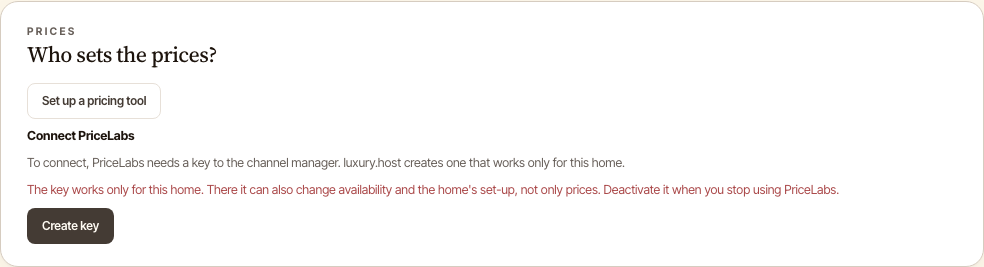
In luxury.host, open the home and go to the Integrations tab. In the section “Who sets the prices?” you find the block “Connect PriceLabs”. Click “Create key”.
luxury.host creates a key that works only for this home and shows it. Click “Copy”. The key is shown only once, so copy it right away.
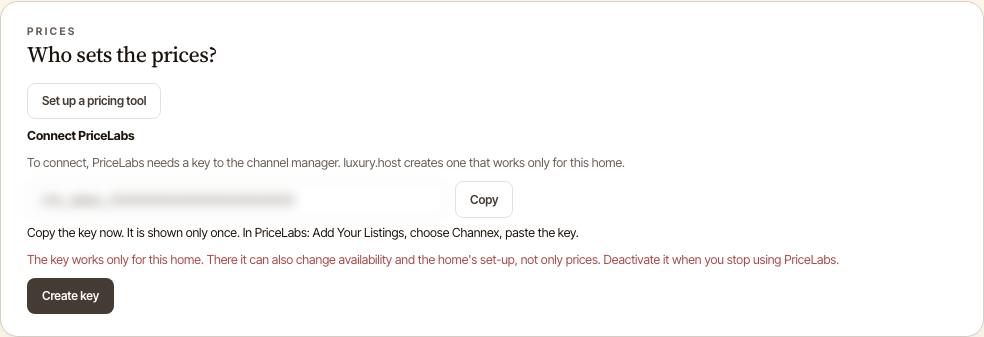
Keep the key private, like a password. For this home it can also change availability and set-up, not only prices. If you lose it, click “Create a new key”: luxury.host withdraws the old key first.
Step 2: add the home in PriceLabs
In PriceLabs, click “Add Your Listings”, choose “Channex” from the list, paste the key and click “Connect”. Channex is the channel manager luxury.host uses. The rooms of the home then appear in PriceLabs as listings. Add another home the same way: create its own key in luxury.host and paste it into PriceLabs. Do not turn on price sync yet.
Step 3: choose the rate plans PriceLabs may update
This step protects the prices your booking sites sell. Without it, PriceLabs can write one price to every rate plan of the room, also the plans the booking sites sell, and ignore the differences between them.
In PriceLabs, open Pricing Dashboard, then Review Prices, and find Rate Plan Customization. Set each rate plan:
- A plan PriceLabs should price: update type “Price”. If the plan should cost more or less than the default plan, give it a fixed or percentage offset.
- A plan PriceLabs must not touch: update type “None”.
- Do not choose “Price and Restrictions”. Minimum stay and the other restrictions stay set in luxury.host.
PriceLabs needs one default rate plan for each listing. It takes the first plan it imported unless you choose another one.
Step 4: switch the home to PriceLabs in luxury.host
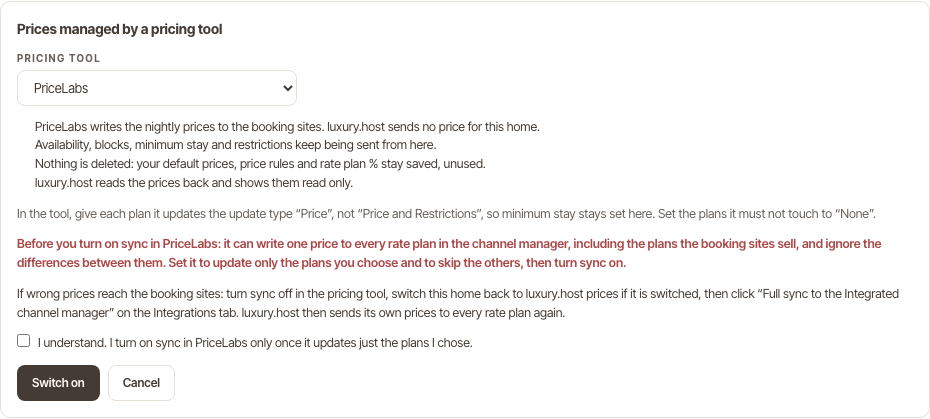
In luxury.host, on the Integrations tab under “Who sets the prices?”, click “Set up a pricing tool” and choose PriceLabs. The window lists what changes: PriceLabs writes the nightly prices to the booking sites, and luxury.host sends no price for this home. Availability, blocks, minimum stay and restrictions are still sent from luxury.host. Nothing is deleted: your default prices, price rules and rate plan percentages stay saved, unused.
Read the warning, tick the box and click “Switch on”.
Step 5: turn on sync in PriceLabs
Back in PriceLabs, turn on Sync Prices, or click Sync Now to send the prices once. In luxury.host the home now says “Prices are managed in PriceLabs”, and its availability calendar shows the prices read back from the channel manager, read only.
What syncs where
- PriceLabs sends the nightly prices of the rate plans you set to “Price”.
- luxury.host sends availability, blocks, minimum stay and the other restrictions.
If wrong prices reach the booking sites
- Turn sync off in PriceLabs.
- In luxury.host, open the home's Integrations tab, click “Switch back to luxury.host” and confirm.
- Click “Full sync to the Integrated channel manager” on the same tab. luxury.host then sends its own prices to every rate plan again.
To stop using PriceLabs for good, do the same and click “Deactivate key” in the “Connect PriceLabs” block. After that, PriceLabs cannot reach the home.
Source for the PriceLabs steps: PriceLabs help center, How to integrate PriceLabs with Channex. PriceLabs is a separate service, not part of luxury.host. Screens from a luxury.host demo home.